
Press Ctrl+ and K to search
目录
环境
CentOS7
国内可用yum 源
- [清华大学源配置教程][cnnic] [cnnic]: https://mirrors.cnnic.cn/help/centos/ "清华大学源配置教程"
更改系统yum为国内源
- 进入
/etc/yum.repos.d目录使用mv备份当前yum配置
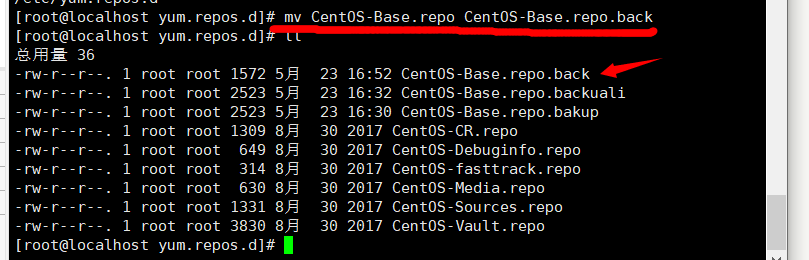
- 使用
curl下载repo文件,以下地址用阿里云yum源curl -o /etc/yum.repos.d/CentOS-Base.repo http://mirrors.aliyun.com/repo/Centos-7.repo
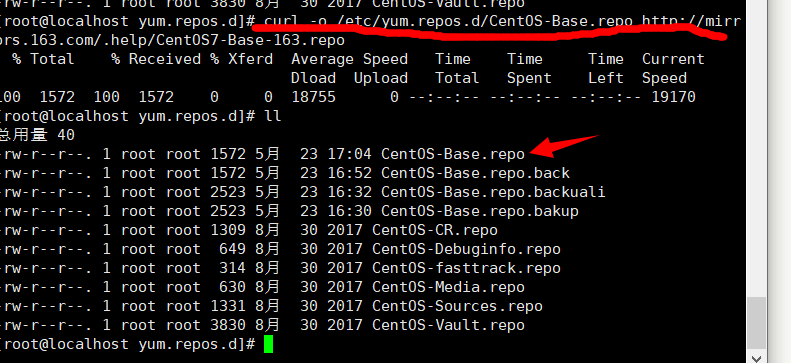
- 使用
yum clean all清空本次缓存,使用yum makecache生成新的缓存。
[root@localhost yum.repos.d]# yum clean all
已加载插件:fastestmirror
正在清理软件源: base extras updates
Cleaning up everything
Maybe you want: rm -rf /var/cache/yum, to also free up space taken by orphaned data from disabled or removed repos
Cleaning up list of fastest mirrors
[root@localhost yum.repos.d]# yum makecache
已加载插件:fastestmirror
base                                                            | 3.6 kB  00:00:00
extras                                                          | 2.9 kB  00:00:00
updates                                                         | 2.9 kB  00:00:00
(1/10): base/7/x86_64/group_gz                                  | 153 kB  00:00:00
(2/10): base/7/x86_64/filelists_db                              | 7.1 MB  00:00:03
(3/10): base/7/x86_64/other_db                                  | 2.6 MB  00:00:01
(4/10): extras/7/x86_64/filelists_db                            | 205 kB  00:00:02
(5/10): extras/7/x86_64/primary_db                              | 194 kB  00:00:02
(6/10): extras/7/x86_64/other_db                                | 122 kB  00:00:00
(7/10): updates/7/x86_64/primary_db                             | 1.3 MB  00:00:00
(8/10): updates/7/x86_64/filelists_db                           | 980 kB  00:00:00
(9/10): updates/7/x86_64/other_db                               | 183 kB  00:00:00
(10/10): base/7/x86_64/primary_db                               | 6.1 MB  00:00:10
Determining fastest mirrors
元数据缓存已建立
yum相关操作
search搜索yum源中相关yum软件包
[root@localhost yum.repos.d]# yum search vim
已加载插件:fastestmirror
Loading mirror speeds from cached hostfile
================================== N/S matched: vim ===================================
protobuf-vim.x86_64 : Vim syntax highlighting for Google Protocol Buffers descriptions
vim-X11.x86_64 : The VIM version of the vi editor for the X Window System
vim-common.x86_64 : The common files needed by any version of the VIM editor
vim-enhanced.x86_64 : A version of the VIM editor which includes recent enhancements
vim-filesystem.x86_64 : VIM filesystem layout
vim-minimal.x86_64 : A minimal version of the VIM editor

  名称和简介匹配 only,使用“search all”试试。
install安装yum软件包
[root@localhost yum.repos.d]# yum vim-common.x86_64
已加载插件:fastestmirror
没有该命令:vim-common.x86_64。请使用 /usr/bin/yum --help
[root@localhost yum.repos.d]# yum install vim-common.x86_64
已加载插件:fastestmirror
Loading mirror speeds from cached hostfile
正在解决依赖关系
--> 正在检查事务
---> 软件包 vim-common.x86_64.2.7.4.629-6.el7 将被 安装
--> 正在处理依赖关系 vim-filesystem,它被软件包 2:vim-common-7.4.629-6.el7.x86_64 需要
--> 正在检查事务
---> 软件包 vim-filesystem.x86_64.2.7.4.629-6.el7 将被 安装
--> 解决依赖关系完成

依赖关系解决

=======================================================================================
 Package                 架构            版本                      源             大小
=======================================================================================
正在安装:
 vim-common              x86_64          2:7.4.629-6.el7           base          5.9 M
为依赖而安装:
 vim-filesystem          x86_64          2:7.4.629-6.el7           base           11 k

事务概要
=======================================================================================
安装  1 软件包 (+1 依赖软件包)

总下载量:5.9 M
安装大小:21 M
Is this ok [y/d/N]: y
Downloading packages:
警告:/var/cache/yum/x86_64/7/base/packages/vim-filesystem-7.4.629-6.el7.x86_64.rpm: 头V3 RSA/SHA256 Signature, 密钥 ID f4a80eb5: NOKEY
vim-filesystem-7.4.629-6.el7.x86_64.rpm 的公钥尚未安装
(1/2): vim-filesystem-7.4.629-6.el7.x86_64.rpm                  |  11 kB  00:00:00
(2/2): vim-common-7.4.629-6.el7.x86_64.rpm                      | 5.9 MB  00:00:02
---------------------------------------------------------------------------------------
总计                                                      2.5 MB/s | 5.9 MB  00:02
从 http://mirrors.163.com/centos/RPM-GPG-KEY-CentOS-7 检索密钥
导入 GPG key 0xF4A80EB5:
 用户ID     : "CentOS-7 Key (CentOS 7 Official Signing Key) <security@centos.org>"
 指纹       : 6341 ab27 53d7 8a78 a7c2 7bb1 24c6 a8a7 f4a8 0eb5
 来自       : http://mirrors.163.com/centos/RPM-GPG-KEY-CentOS-7
是否继续?[y/N]:y
Running transaction check
Running transaction test
Transaction test succeeded
Running transaction
  正在安装    : 2:vim-filesystem-7.4.629-6.el7.x86_64                              1/2
  正在安装    : 2:vim-common-7.4.629-6.el7.x86_64                                  2/2
  验证中      : 2:vim-common-7.4.629-6.el7.x86_64                                  1/2
  验证中      : 2:vim-filesystem-7.4.629-6.el7.x86_64                              2/2

已安装:
  vim-common.x86_64 2:7.4.629-6.el7

作为依赖被安装:
  vim-filesystem.x86_64 2:7.4.629-6.el7

完毕!
remove删除软件包
[root@localhost yum.repos.d]# yum remove vim-common.x86_64
已加载插件:fastestmirror
正在解决依赖关系
--> 正在检查事务
---> 软件包 vim-common.x86_64.2.7.4.629-6.el7 将被 删除
--> 解决依赖关系完成

依赖关系解决

=======================================================================================
 Package              架构             版本                      源               大小
=======================================================================================
正在删除:
 vim-common           x86_64           2:7.4.629-6.el7           @base            21 M

事务概要
=======================================================================================
移除  1 软件包

安装大小:21 M
是否继续?[y/N]:y
Downloading packages:
Running transaction check
Running transaction test
Transaction test succeeded
Running transaction
  正在删除    : 2:vim-common-7.4.629-6.el7.x86_64                                  1/1
  验证中      : 2:vim-common-7.4.629-6.el7.x86_64                                  1/1

删除:
  vim-common.x86_64 2:7.4.629-6.el7

完毕!
list列出已安装或可安装的yum软件包
xml[root@localhost yum.repos.d]# yum list vim*
已加载插件:fastestmirror
Loading mirror speeds from cached hostfile
已安装的软件包
vim-filesystem.x86_64                     2:7.4.629-6.el7                     @base
vim-minimal.x86_64                        2:7.4.160-2.el7                     @anaconda
可安装的软件包
vim-X11.x86_64                            2:7.4.629-6.el7                     base
vim-common.x86_64                         2:7.4.629-6.el7                     base
vim-enhanced.x86_64                       2:7.4.629-6.el7                     base
vim-minimal.x86_64                        2:7.4.629-6.el7                     base
[root@localhost yum.repos.d]#
-h帮助列表
[root@localhost yum.repos.d]# yum -h
已加载插件:fastestmirror
Usage: yum [options] COMMAND

List of Commands:

check          检查 RPM 数据库问题
check-update   检查是否有可用的软件包更新
clean          删除缓存数据
deplist        列出软件包的依赖关系
distribution-synchronization 已同步软件包到最新可用版本
downgrade      降级软件包
erase          从系统中移除一个或多个软件包
fs             Acts on the filesystem data of the host, mainly for removing docs/lanuages for minimal hosts.
fssnapshot     Creates filesystem snapshots, or lists/deletes current snapshots.
groups         显示或使用、组信息
help           显示用法提示
history        显示或使用事务历史
info           显示关于软件包或组的详细信息
install        向系统中安装一个或多个软件包
list           列出一个或一组软件包
load-transaction 从文件名中加载一个已存事务
makecache      创建元数据缓存
provides       查找提供指定内容的软件包
reinstall      覆盖安装软件包
repo-pkgs      将一个源当作一个软件包组,这样我们就可以一次性安装/移除全部软件包。
repolist       显示已配置的源
search         在软件包详细信息中搜索指定字符串
shell          运行交互式的 yum shell
swap           Simple way to swap packages, instead of using shell
update         更新系统中的一个或多个软件包
update-minimal Works like upgrade, but goes to the 'newest' package match which fixes a problem that affects your system
updateinfo     Acts on repository update information
upgrade        更新软件包同时考虑软件包取代关系
version        显示机器和/或可用的源版本。
...
注意
- 切换成功后记得使用
yum install yum-plugin-fastestmirror安装这个插件,要不然搜索不到软件
参考
本文作者:Cheng
本文链接:
版权声明:本博客所有文章除特别声明外,均采用 本原创文章未经允许不得转载 许可协议。转载请注明出处!
目录